You know what you did at work. Explaining it in a CV bullet or a short professional Summary can be harder, especially when your notes say things like “reports, onboarding, team support.”
CVZilla’s AI Assistant helps turn those fragments into draft CV copy inside Profile. You supply the experience; the assistant helps with the wording. You still decide whether the result is accurate and worth keeping.
What CVZilla’s AI Assistant is actually for
The assistant is an in-context writing aid in Profile. It supports experience bullets and the Summary: two places where the same work needs to be described at different levels of detail.
A bullet can make one responsibility or contribution easier to understand. The Summary is a short professional introduction, bringing the most relevant parts of your experience together. Use the assistant when you have the facts but need help finding a clear way to express them.
You open it from supported fields rather than having to compose the whole CV at once. The assistant can be minimized, expanded, or closed, and a selected result enters the field only after you confirm it.
Start in Profile with the part that is giving you trouble. If a single duty sounds vague, work on the bullet; if your introduction feels generic or thin, start with the Summary.
How bullet writing works when your notes are messy
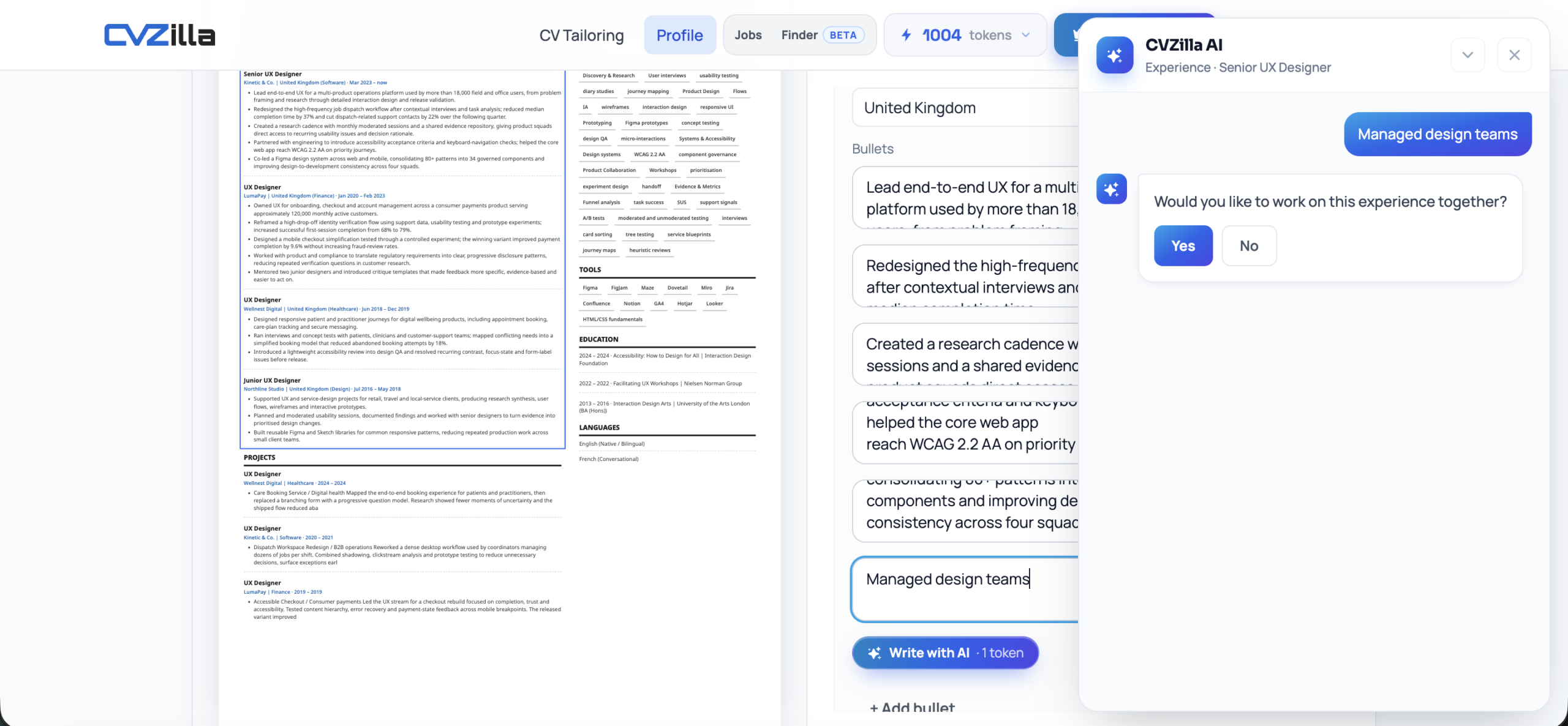
On a supported bullet, click, tap, or focus the field to see Write with AI. If the field already contains text, you will be asked to confirm before the assistant starts.
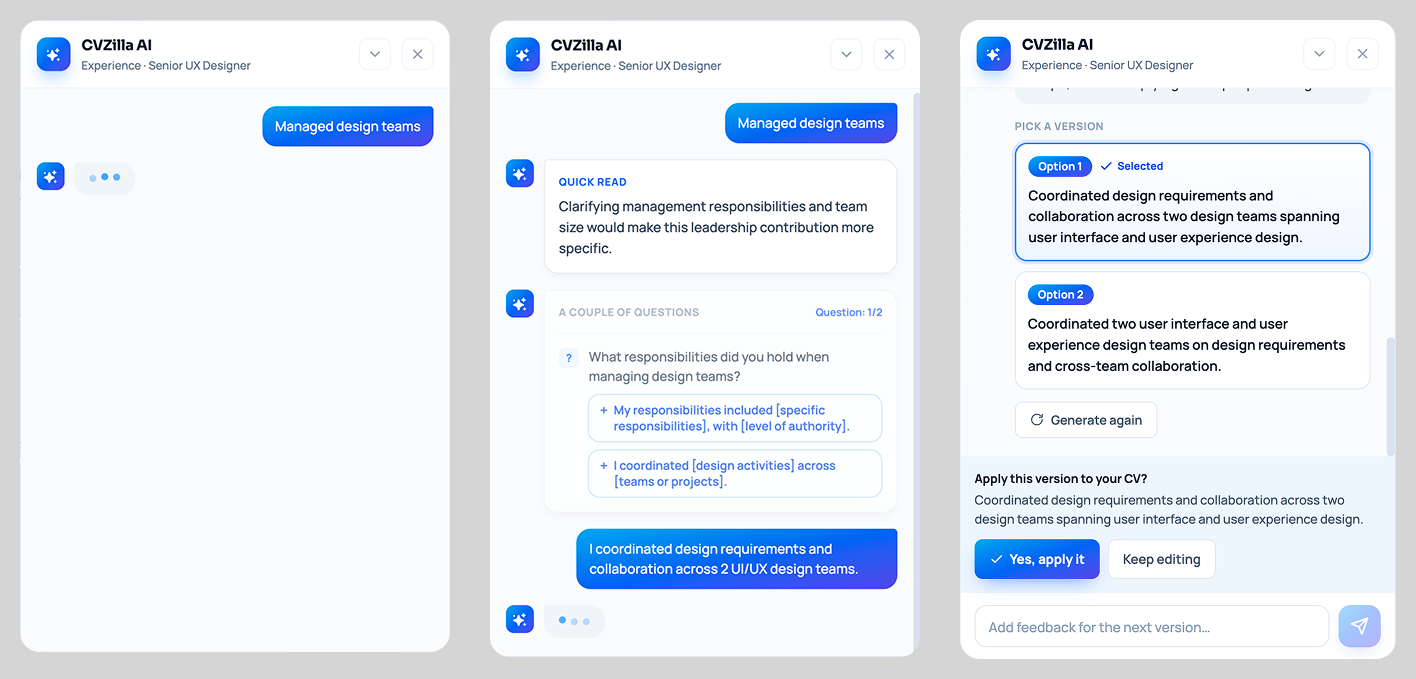
The assistant asks for facts about the work. It can offer suggestions and, where available, a Skip option. Afterward, it generates two alternatives. You can compare them, regenerate with feedback, and select and confirm the version you want; it then enters the field and saves like a normal Profile edit.
For a useful starting point, include what you did, what you worked with, and any result you can substantiate. The NACE resume rubric recommends action verbs and specific examples, which help a reader see the work behind a broad duty.
Consider a hypothetical note: “helped with onboarding and reports.” If the person actually prepared onboarding materials and compiled weekly reports, a clearer bullet might read: “Prepared onboarding materials and compiled weekly reports for the team.” That is an illustration of an editorial choice, not a promised assistant response.
The added detail makes the work more concrete, but only if it is true. A phrase such as “transformed onboarding” would claim a result the note does not establish. If you know what changed, add that fact; if you do not, keep the bullet focused on the work you can describe.
If you have used Profile Roasting, compatible advice can also guide an Improve with AI session. For more on the writing itself, see how to make experience bullets credible to recruiters.
How Summary drafting differs from bullet drafting
A bullet describes a piece of work; a Summary gives the reader a concise introduction to your professional experience. It is useful when your first version lists strengths without showing what they are based on, or when you are unsure which experience to foreground.
In the Summary, choose Write with AI or Improve with AI to open the same assistant. If the field is not empty, starting requires confirmation. After clarification, it returns two alternatives with different structure or emphasis, using the same supported facts and responsibility level.
The alternatives are normally 25–50 words. You can regenerate them, give feedback, and confirm the version you want to apply. Compare the emphasis as well as the wording: one version may introduce the experience most relevant to your intended role more clearly than the other.
Give the assistant concrete context: your professional background, the work you have actually done, and the strengths that follow from it. SHRM’s examples of career summaries show how a concise overview can highlight relevant qualifications; a paragraph is one possible format, not a universal rule.
Supported total professional experience normally appears near the start and remains distinct from time in the target profession. If a duration is not supported, it is omitted rather than guessed. Check that a career change has not been compressed into a misleading claim about years in your new field.
For an early-career candidate, concrete contributions can give the Summary substance without inventing seniority. For example, describe the reports you compiled or materials you prepared, while keeping your dates and level of responsibility accurate.
How to keep the draft useful instead of merely polished
A fluent sentence can still be wrong. Before confirming a draft, check each claim against what you actually did, particularly dates, titles, scope and any numbers. NIST’s guidance on trustworthy AI emphasizes accountability and context; in a CV, that means you remain responsible for the claims under your name.
Return to the onboarding example. If a draft says you led the process but you prepared materials for someone else, change the verb. If it claims a reduction in onboarding time, keep that result only if you can support it. A clean sentence is not evidence of an outcome.
You can keep useful structure while changing individual words. Replace vague praise with a concrete task, remove a metric you cannot verify, or give feedback and regenerate when neither alternative captures your contribution. The same test applies to a Summary: does its description fit both your experience and your level of responsibility?
If you are missing a detail, look for a defensible fact rather than filling the gap with a more impressive phrase. It is fine for a bullet to describe a responsibility without a numerical result; specificity about the work is more useful than a fabricated achievement.
Choose the field where you are stuck, bring the facts you have, and compare the assistant’s alternatives. Keep the version that makes your real experience easier to understand–and edit anything that changes what you actually did.