
A long vacancy list can turn job hunting into scrolling, not deciding.
CVZilla Jobs is built for that moment.
Start broad, remove obvious mismatches, then open only the roles worth your time.
That workflow matters because every extra listing you open adds friction.
A better search process helps you spend more energy on fit, not noise.
It also helps you avoid the trap of treating every listing as equally important.
When the list is large, speed comes from filtering early and reading later.
Why faster job search matters when the list is too large
When the vacancy list is huge, the first problem is not writing a CV. It is deciding where to look first.
CVZilla Jobs gives you a discovery step before application work. It helps you narrow a crowded list into a smaller, more useful set.
That is why the Jobs area should feel like a starting point, not a final answer. It is marked beta, so you should not treat its coverage as complete or exhaustive.
The practical goal is simple. Spend less time on obvious mismatches. Spend more time on roles that deserve a closer read.
If a role looks close at first glance, you can open it. If it clearly misses the mark, move on faster.
This is also where role fit matters more than company glamour. A strong company name does not fix a weak match.
If you want that distinction in more depth, see Company fit and role fit are not the same thing.
For job seekers, that mindset is useful because it keeps attention on the vacancy itself.
The Jobs area can support discovery, but it does not replace judgment.
You still decide which roles deserve a deeper look and which ones do not.
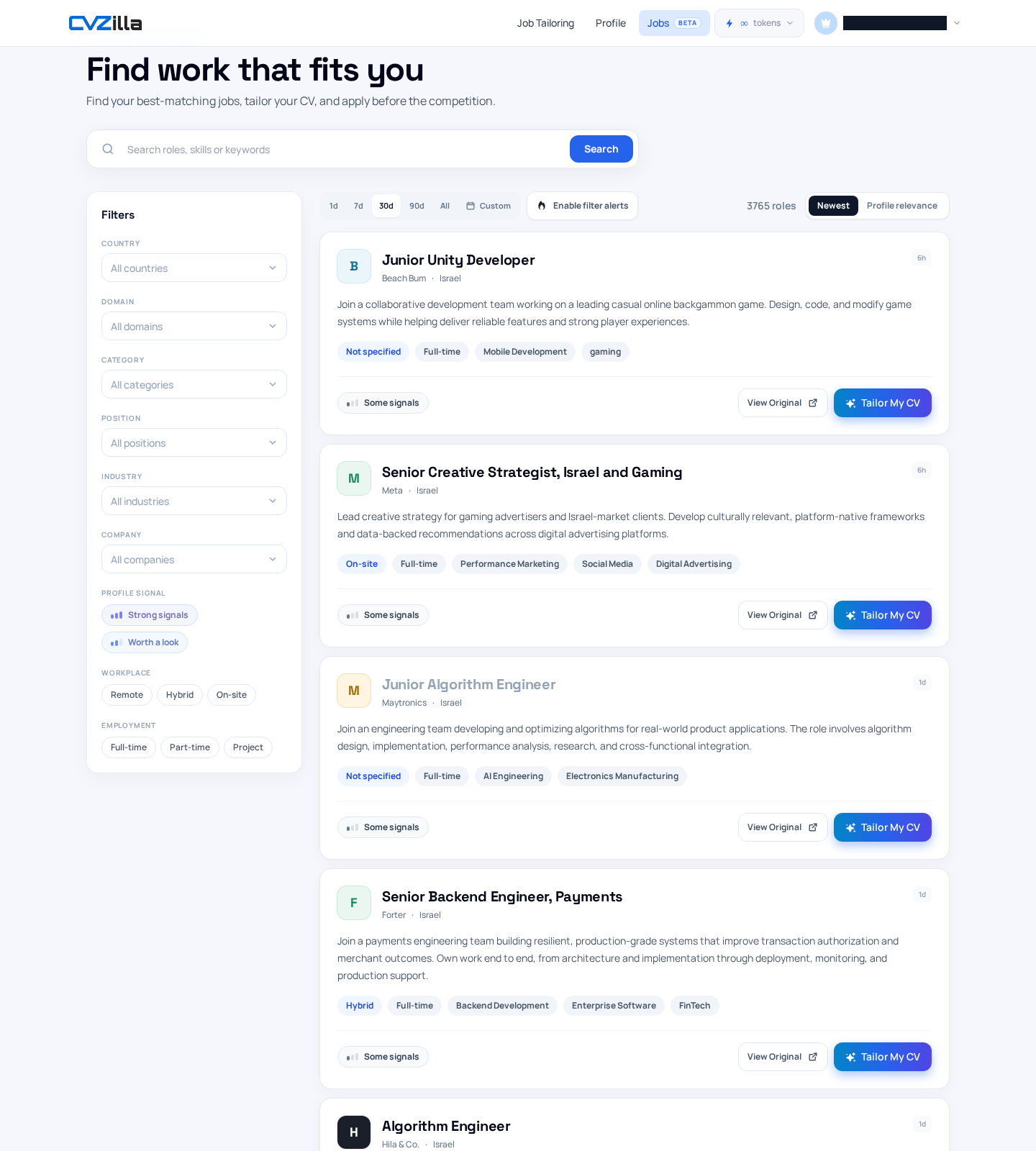
Start with a broad role, skill, or keyword search
The fastest first pass is usually a broad query. CVZilla’s Jobs search accepts role, skill, and keyword text.
That means you can search by title, a core skill, or a useful phrase from the vacancy list.
Use this when you already know the area you want, but not the exact opening.
A broad search helps you see the shape of the market before you narrow it.
You are not trying to solve the full decision here. You are trying to remove noise.
The Search control applies your query while keeping active filters, the selected period, and the sort choice in place.
That makes search a good starting layer, not a reset button.
If you want a reminder to work from the real vacancy once you find a promising role, read The vacancy is the brief: start tailoring from the real job.
A useful habit is to search the same role with a few wording choices. Job titles vary more than job seekers expect.
For broader naming patterns, O*NET Online occupation profiles can help you think beyond a single title.
Searching broadly first helps you catch those variations without opening each listing separately.
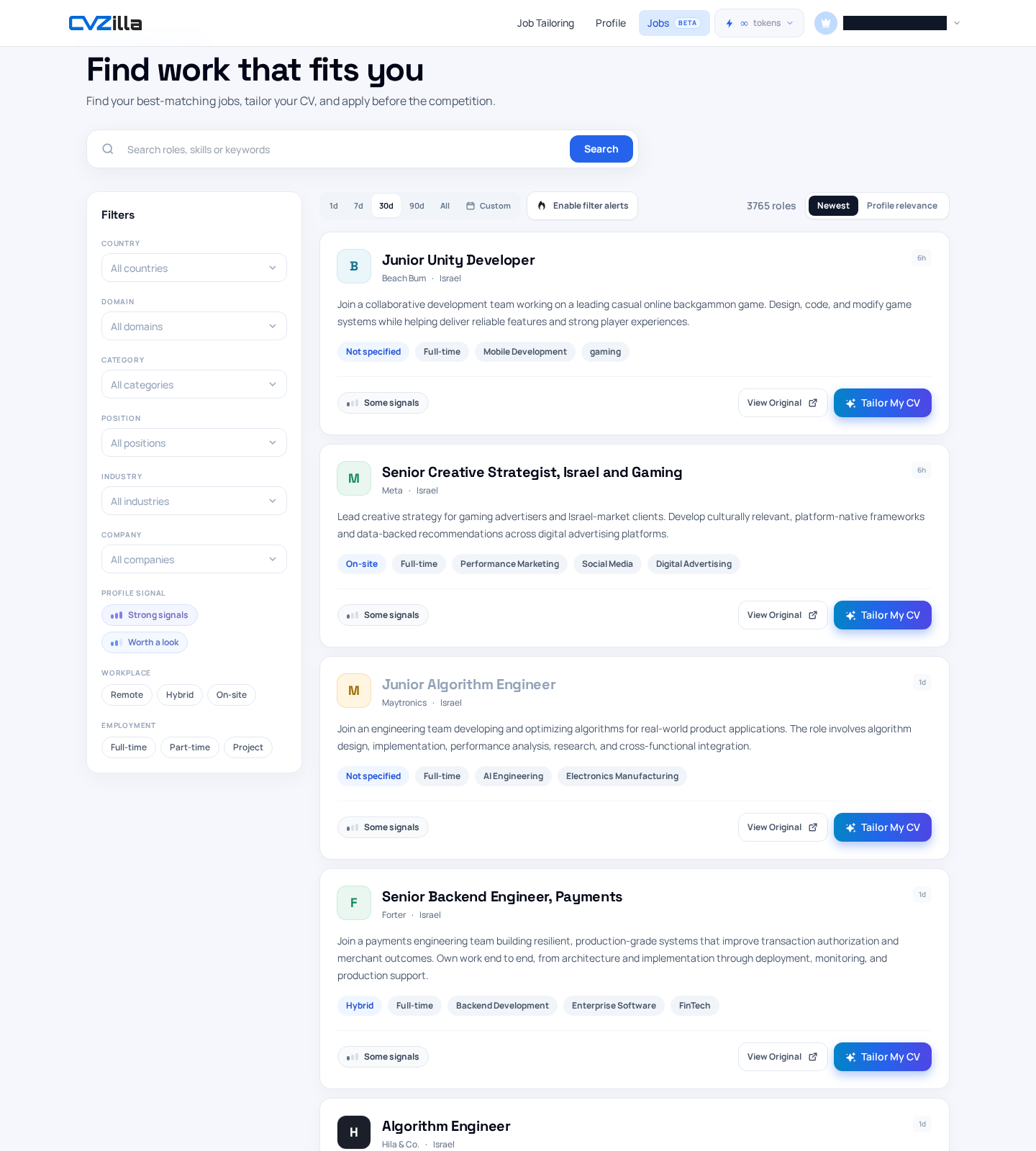
Use filters to remove obvious mismatches early
Once the search surface is broad enough, filters do the real pruning.
CVZilla Jobs includes country, domain, category, position, industry, company, profile signal, workplace, employment, and publication period filters.
Use the ones that eliminate obvious deal-breakers first.
Location is often the quickest cut. If a country is wrong, the listing is not worth much review.
Workplace and employment type are also useful early filters. They remove roles that do not match your preferences.
Industry, category, and position help when the same title appears across very different contexts.
Profile-signal filters add another layer. Strong signals and Worth a look can help you focus on jobs that better match your profile.
Those profile-signal filters require a profile, and company filtering is Pro-only.
That matters because not every account state exposes every control.
Keep the workflow simple. Filter for the biggest mismatch first, then refine further only if needed.
Every filter change updates the URL and resets pagination to page 1.
That is useful because it keeps your search state shareable and your results anchored on the newest narrowed view.
When you are shaping a search by occupation rather than title, official role descriptions like the BLS Occupational Outlook Handbook can also help you spot the right wording.
The point is not to build a perfect taxonomy.
The point is to remove the vacancies you already know you do not want.
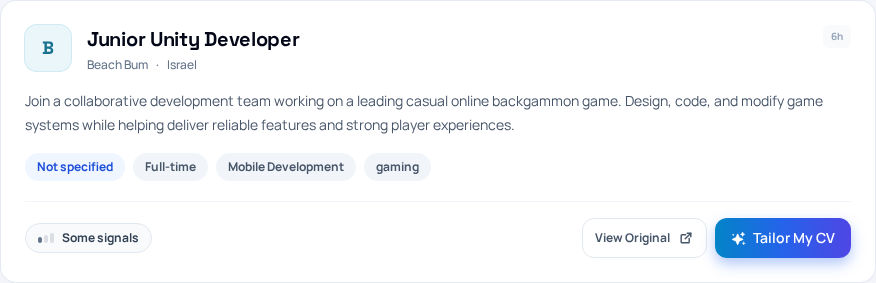
Sort and scan the results list to compare fit quickly
After filtering, the results list becomes your comparison layer.
CVZilla offers Newest and Profile relevance sorting.
Profile relevance requires sign-in plus a profile, so it is not always available.
Use Newest when freshness matters most. Use Profile relevance when you want the list ordered around your profile signal.
The value is not in reading every listing fully. It is in deciding which ones deserve a click.
Result cards can show title, company, location, summary, workplace type, employment type, industries, and a relevance signal.
That gives you enough context to compare fit before opening each listing.
Look for the parts that usually predict work shape: location, workplace type, employment type, and industry.
Then check the summary for role scope and obvious mismatches.
A card with the right title can still be wrong for your situation. A card with the wrong title can still be interesting.
That is why role fit and company fit are different checks, not one check.
When a card looks promising, you do not need to guess your next step.
The actions already support the handoff from browsing to work.
You can move to View Original or Tailor My CV from the card itself.
This is where the list becomes practical rather than abstract.
Instead of opening ten vacancies to find two good ones, you can compare the cards first.
That small change saves attention for the listings that actually merit a closer look.
Know when the shortlist is specific enough to move on
A narrowed search is only useful if it changes your behavior.
When the results list is tight enough, stop treating it like browsing.
At that point, the list should feel small enough to review carefully and choose from.
If most cards are clearly wrong, your filters are probably not doing enough.
If only a few cards remain and they feel relevant, you have likely done enough searching for now.
That is the moment to move from discovery to application work.
From the shortlist, use the card action that fits the next step.
View Original keeps the source vacancy authoritative for availability and requirements.
That matters because the original listing remains the reference point for what the employer actually asked for.
The Jobs interface helps you discover and prioritize. It does not replace the source vacancy.
So the rule is practical, not perfect. Browse until the list is useful, then stop.
If you keep filtering after the shortlist already looks strong, you may waste time polishing a search that is already good enough.
A better move is to pick the best roles and use the vacancy as the brief for tailoring.
That keeps the job search moving toward action instead of endless refinement.
The finish line is not a perfectly optimized search.
The finish line is a shortlist you trust enough to work from.
The fastest way to use CVZilla Jobs is also the simplest.
Search broadly, filter for obvious mismatches, sort the list, and scan the cards for fit.
Then stop once the shortlist is narrow enough to justify tailoring.
That workflow saves time because it moves you away from every vacancy and toward the few that matter.
When a result looks promising, let the source vacancy guide the next step.