
A broad background is useful until the page feels crowded.
When every role, skill, and side path sits at the same height, the CV can lose shape.
That is where CV section visibility helps.
It gives you a way to keep the master profile broad, while making the page easier to read.
The goal is not to erase anything.
It is to make the right material easier to notice.
That matters when you are working from a profile that needs to serve more than one role.
A master CV should hold enough range to support future tailoring, but it still has to read like a deliberate document.
If the page feels noisy, the problem is often not the experience itself.
It is the way the sections compete for attention.
Visibility control is useful because it lets you reduce visual clutter without shrinking the underlying record.
That makes the base CV easier to scan, and easier to reuse later.
Why a broad background becomes hard to scan
A broad CV often has the opposite problem of a thin one. There is plenty of evidence, but not enough separation. Roles compete with each other. Skills stack up. Extra sections start to look like noise.
That can make a strong profile feel less purposeful than it really is. The reader has to work harder to find the path through your experience, and that weakens the first impression even when the substance is solid.
This matters because the Profile area is your master CV and the reusable source for tailored versions. If you narrow too early, you can lose useful experience that may matter later.
The better move is to keep the master profile broad enough to preserve that material, then shift emphasis when you tailor. That keeps the facts intact while making the page more readable.
In practice, a broad profile should collect evidence first and edit shape second. You do not want to decide, too early, that a section has no future value just because it is not needed for the current application.
That is the real tension on a wide CV. You need enough range to stay useful, but enough structure to stop the page from feeling crowded. CV section visibility helps solve that tension.
For more on how readers approach a page like this, see What a recruiter sees before they read your bullet points. If you are also deciding whether your document feels too long, CV length is a decision, not a rule adds helpful context.
When spacing and section hierarchy are clear, the CV feels intentional. When everything looks equally important, even good material can become harder to trust at a glance.
- A broad profile can be noisy even when the experience is relevant.
- The master CV should preserve useful material for later tailoring.
- Emphasis can change without changing the facts.
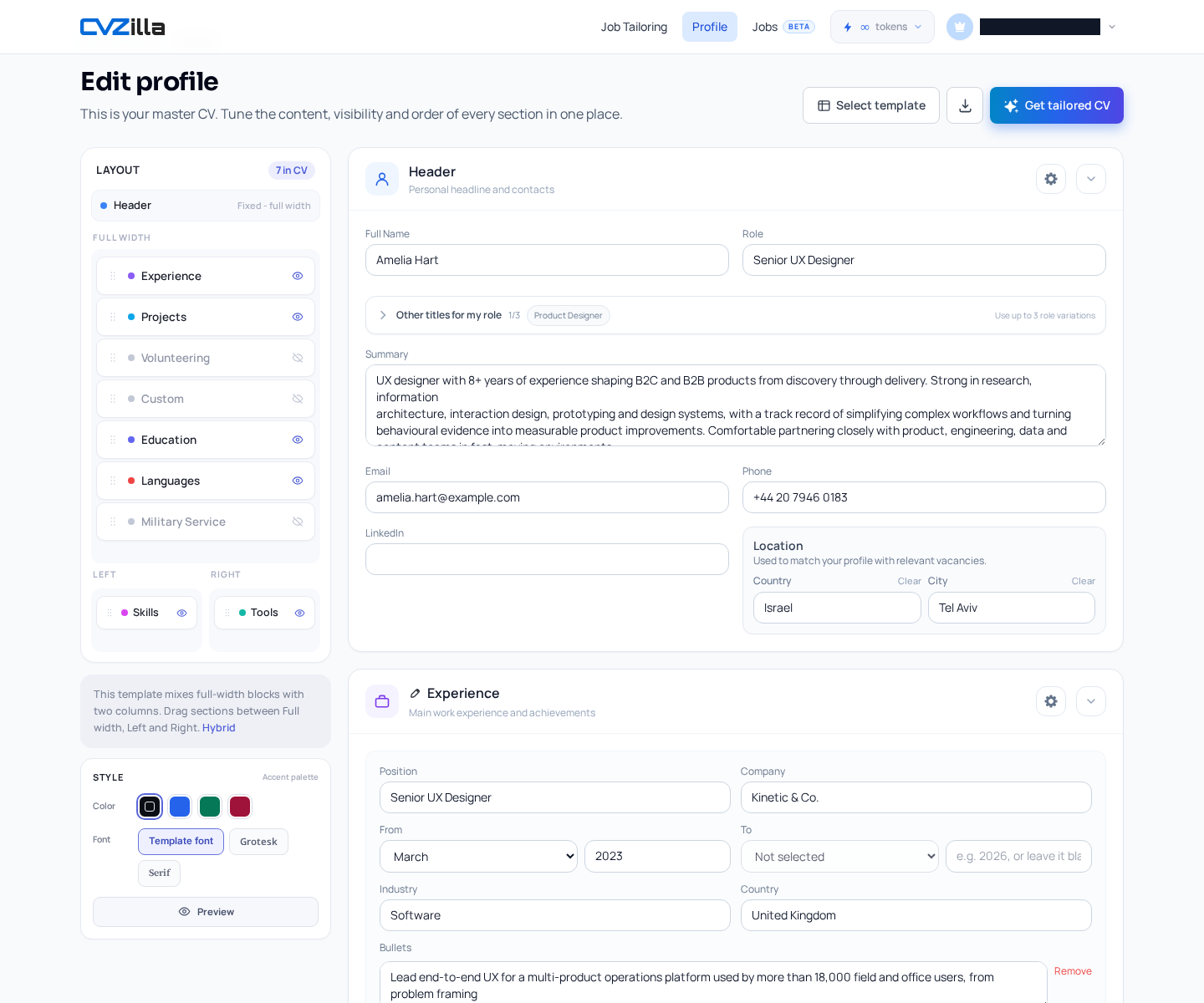
How section visibility makes the base CV feel intentional
The Profile editor is built for this kind of tuning. It is the place where content, visibility, and order can be adjusted together. That means you are not fighting the page in separate tools.
You are shaping one reusable base CV. That matters because broad experience usually needs editing at the level of presentation, not deletion. The structure should help the reader follow the logic of your background.
The visibility control is simple in principle. The eye button hides or shows a section in the generated CV without deleting the data behind it. So if a section is not useful for the current shape of the CV, you can tuck it away safely.
If you need it again, hidden section types can be restored with Add section. Only one section of each type is allowed, which keeps the profile structured instead of duplicated. That is useful when a broad profile needs restraint.
The editor also frames the sections as cards you can collapse, expand, rename except for Header, and open in settings. That gives you several ways to reduce visual pressure without losing the underlying information.
In a broad CV, that is a practical advantage. You can keep experience on file, but stop every section from competing for the same amount of space. The result is a cleaner page and a clearer reading order.
If you want to work directly in the master profile, open Profile and tune the section layout there. The point is not to make the CV shorter for its own sake. It is to make the content easier to interpret quickly.
- Tune content, visibility, and order in one place.
- Hide a section without deleting its data.
- Restore hidden section types with Add section.
- Only one section of each type is allowed.
Which sections deserve prominence
There is no universal rule for which sections must stay visible on every broad CV. That choice depends on the role, the evidence, and the story you want the page to tell.
A recruiter does not need every possible section to be loud at once. They need the strongest path through your experience. For some profiles, that means making recent relevant work easy to see first. For others, it means keeping a key qualification or project section in view.
The important part is that visibility supports the story, rather than flattening it. A section earns prominence when it helps the reader understand fit faster.
Visible sections can also be moved across valid template zones. That helps the page read with intention, not just with volume. Layout matters because a section can be visible but still badly placed.
This is why broad profiles often benefit from a quick hierarchy check. Ask which sections support the target role, which sections add helpful proof, and which ones are still true but do not need to lead. That is an editorial decision, not a fixed rule.
The supplied documentation describes manual visibility and placement controls, but not presets, automatic recommendations, or AI guidance for choosing what to show or hide. So the judgment stays with you.
If you are also choosing how the frame of the CV should support the content, Pick a CV template that fits the role you want is a useful companion read.
For a broader accessibility perspective on clarity and visual hierarchy, the W3C Web Content Accessibility Guidelines are a solid reference. The idea is simple: clearer structure helps people read faster, even when the content is dense.
So the goal is not to make every section equally visible. The goal is to make the most useful sections easiest to follow, while keeping the rest available when needed.
- There is no one-size-fits-all visibility rule.
- Move visible sections across valid template zones.
- Layout is manual, not preset-driven.
How to keep the CV honest while reducing clutter
Hiding a section changes what appears on the page. It does not delete the underlying data. That distinction matters for broad profiles, because you may need the full record later.
A hidden section can return when the role calls for it. That is cleaner than duplicating content across versions, and safer than trimming away useful detail too early.
CVZilla’s guidance is to keep the master profile broad enough to preserve useful experience. Then tailor the emphasis for the job you want. That means changing what leads, not rewriting reality.
It also means using concrete evidence instead of vague claims. A broad CV should feel selective in presentation, not selective in truth. The reader should see a tighter story, but not a narrower record than you actually have.
That distinction matters if your background crosses functions, industries, or seniority levels. You may not need every section in every application, but you do need the base profile to stay complete enough for future tailoring.
If you want an external reminder that CV content should stay truthful and grounded, GOV.UK CV advice is a practical reference point. The broader principle is consistent: present evidence clearly and avoid padding.
CVZilla should not be described as a way to fabricate experience, mislead recruiters, or promise outcomes. A readable CV is still an honest CV. That is the standard worth keeping.
- Hiding a section does not delete the data.
- Keep the master profile broad enough for future tailoring.
- Change emphasis, not facts.
- Do not use the product to mislead or fabricate.
Why previewing the finished layout matters
A broad CV can look balanced in the editor and awkward in the final render. That is why preview matters.
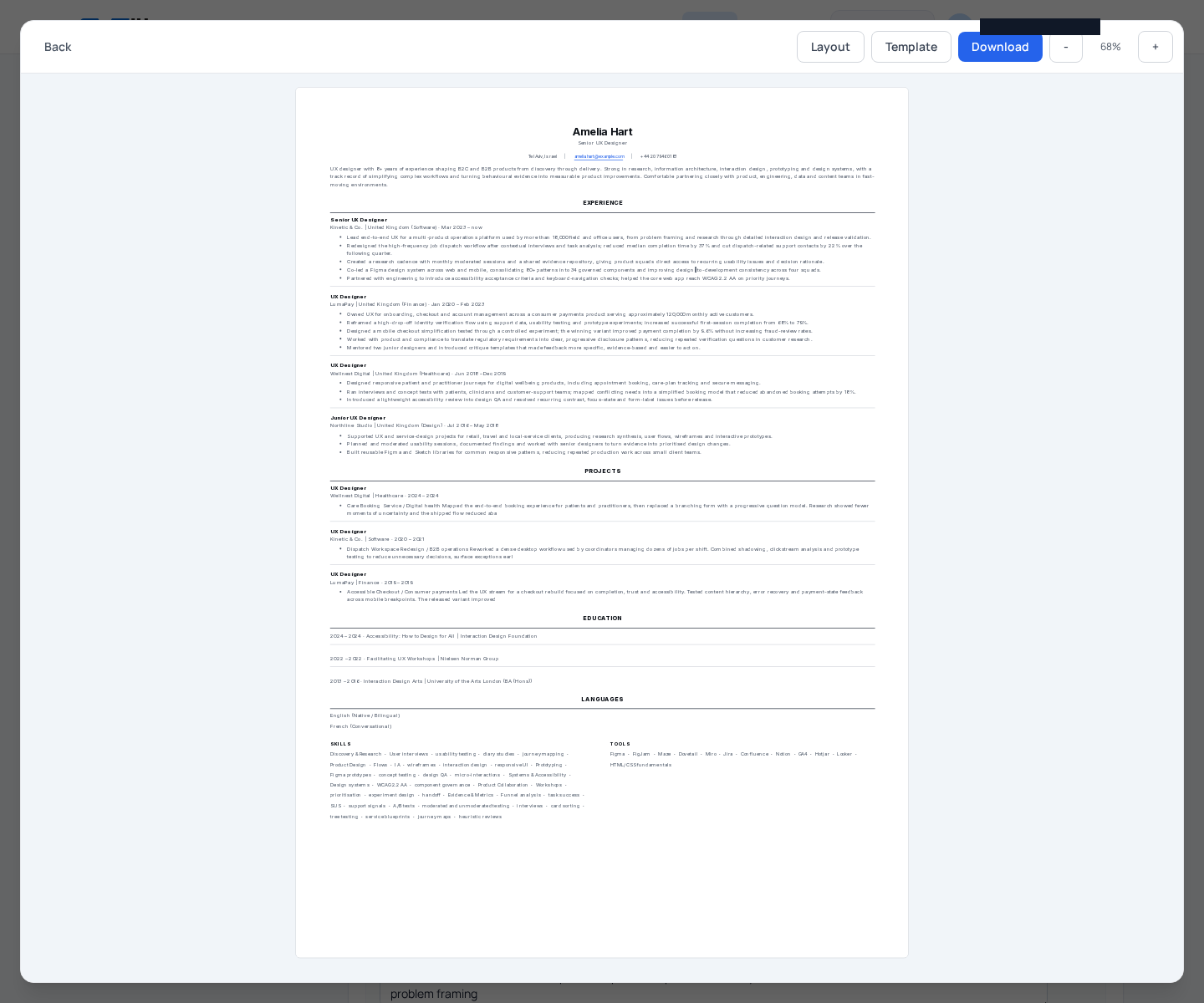
Full-screen preview lets you inspect the CV before you rely on it. It gives you a view of the document as it will actually appear, which is especially useful when the page has many moving parts.
If you change section visibility or move sections between template zones, the preview updates with the layout. That gives you a direct check on what the reader will actually see.
It also helps you catch a common problem with broad profiles: a layout that is technically complete but still too dense to scan comfortably. When that happens, the answer is often not more content. It is better placement, better visibility, or both.
Preview is useful because it closes the loop between editing and reading. You can hide a section, bring one back, or reposition sections, then immediately check whether the page still feels focused.
If the broad profile has to support different jobs, preview keeps the base version honest about how much it can carry on one page. You can confirm whether the visible sections support the role you are targeting, without guessing.
If you are ready to check your own base CV, start in Profile. The editor is the place to adjust section visibility, and the preview is the place to verify the result.
For a related reminder about format choice, What a recruiter sees before they read your bullet points explains why first impressions depend on structure before detail. That is exactly why preview is worth the extra minute.
- Preview shows the finished CV before you use it.
- Layout and template changes update the preview.
- Use preview to check clarity after visibility changes.
A broad CV does not need to feel crowded.
With section visibility, you can keep the underlying profile rich and still make the page easier to scan.
That is the value of a master CV: broad enough to preserve useful experience, controlled enough to read.
Before you tailor or apply, open the profile, adjust visibility, and check the preview.
If you want to start now, the next step is simple. Open Profile and make the base layout easier to read.