
Your experience can be real and still be described in more than one way. That is the idea behind other titles for my role: a small profile edit that helps CVZilla read your background through the language employers actually use.
In the Profile area, this feature lets you add truthful alternative role titles, choose from suggested or custom options, and make one title primary when that better reflects the role you are targeting. The point is not to inflate your background. It is to translate it cleanly before you apply.
Why one job title can map to more than one searchable role
Job titles are labels, not proof of the work behind them. Two people can do very similar work under different titles, and one title can also appear in several related ways across job ads. That is why profile title editing can be useful: it helps you present the same experience in the vocabulary employers are already searching for.
In CVZilla, the Profile area acts as your master CV, so this edit sits upstream of later tailoring. That matters because you are not rebuilding your history every time you look at a new vacancy. You are adjusting the way the same evidence is framed, which is much safer than trying to invent a better-sounding title.
The line between useful and misleading is simple. Add an alternative title only if it is supported by your real responsibilities, decisions, tools, and outcomes. A broader or flashier title cannot turn unsupported work into supported experience, and a title that implies different seniority or scope will usually weaken trust instead of improving matching.
A practical way to test an alias is to ask whether you could defend it in conversation or on the page. If the answer is yes, it may be a legitimate translation. If the answer depends on wishful thinking, it probably belongs in the drafts folder, not in your profile.
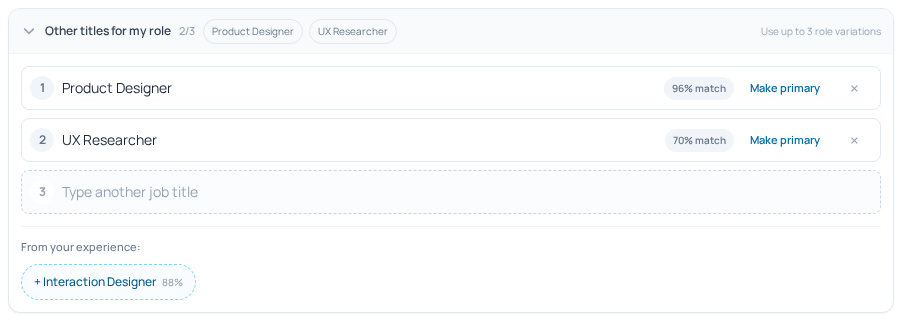
What “Other titles for my role” changes inside Profile
The product behavior is straightforward: other titles for my role is a Pro-only control in the Profile Header section, and it supports up to three alternative titles. That gives you a small but useful set of role variants instead of an open-ended pile of labels. It is meant to sharpen matching, not to scatter your profile across unrelated titles.
You can add a suggested title, enter a custom title, edit or delete aliases, make one title primary, and undo the latest primary-title change. Those controls matter because role language is not always static. If a different title better matches the search target, you can make that the main signal without losing the rest of your truthful variants.
This is also why the feature sits in Profile rather than in a job-specific workflow. Profile is your reusable source CV, so a title edit here can save repeated rewrites later. If you want to review that source profile directly, open the Profile page and check the Header section for the role-alias controls.
The access model is clear too. Basic users see a Pro offer instead of the full role-alias controls, and alternative role titles are listed as part of the Pro value proposition. So if you do not see the feature, it is a subscription boundary rather than a missing setting.
When adjacent titles help: three realistic examples
A backend engineer may find that many vacancies use software engineer instead. If their real work includes product-facing development, that adjacent title can help the profile align with the wording used in the market. If the work was narrowly infrastructure-only, though, the broader title would overstate the fit. The value is in translation, not promotion.
A customer support specialist with workflow coordination, reporting, and process handoffs might reasonably use an operations-adjacent title. That can help the profile match roles where the same work is described through an ops lens. But if the person is still mainly doing support, the alias should stay close to that boundary and not drift into operations management.
A product designer whose work includes user flows, prototyping, and usability testing may reasonably use a UX/UI-aligned title. Some employers advertise that work under different labels, and a truthful alias can bridge that gap. If the background is mostly visual design, however, a stronger UX title would imply capabilities the evidence does not support.
The pattern is consistent across all three examples. Use an adjacent title only when it reflects the same underlying work in the language of the target market. Keep the role family intact, keep the seniority honest, and let the evidence in your profile do the heavy lifting.
How this small profile edit can support faster discovery and cleaner targeting before you apply
The main benefit is practical: the same background may be searched under different titles, so a truthful alias can help your profile line up with the wording used in job ads and in the Jobs area. That can make role matching clearer and reduce the amount of repetitive rework you do before sending an application.
You should think of this as support, not a promise. The feature may help you surface more relevant roles and target your CV more cleanly, but it does not guarantee ranking, shortlist placement, or interviews. Matching still depends on the evidence in your profile and on what the vacancy itself asks for.
This is where the master-CV model becomes useful. One careful edit in Profile can save you from maintaining multiple near-duplicate CV files for adjacent titles, which keeps your search process faster and your source profile easier to keep current. For the larger rationale behind that approach, see Why one profile is easier to keep current than multiple CV files.
A simple workflow works well here. First, keep the truthful primary title that best reflects the work you actually did. Then add up to three adjacent aliases only when they are defensible. Finally, review the vacancy language and tailor the application with the framing that best matches that specific role. For how title language fits into broader job matching, O*NET’s Summary Report help is not the point; rather, the key idea is that real occupations often surface under multiple reported titles.
Who can use it: PRO subscription
Other titles for my role is included with a PRO subscription. If you are on Basic, you will see the Pro offer instead of the full set of role-alias controls. That makes the access rule simple: the feature is available to PRO users, and unavailable in the basic tier.
The Pro offer explicitly includes alternative role titles among its benefits, so this is not a hidden advanced setting. It is part of the value of the subscription for people whose experience genuinely fits more than one adjacent title.
If you only have one stable and obvious title, you may not need this immediately. If your background is truthful under several related titles, though, the feature can help you align the profile with the language you want to target without rewriting your whole CV from scratch. In that sense, the edit is small, but the search behavior it supports can be meaningful.
If your experience fits more than one real role label, other titles for my role gives you a tidy way to reflect that in Profile. The best use case is translation: one body of evidence, framed in the language employers actually search.
Keep the aliases truthful, keep the set small, and make the primary title match the role you are targeting. Then use the same profile to narrow in on relevant jobs and tailor from there. If you want to check the control, open your Profile and review the Header section.