If you are trying to track job applications across more than a few roles, the process can get messy fast. One version of your CV lives in downloads, another in email, and the status of each application slowly turns into a memory test. CVZilla’s Job Tailoring area gives you one place to review what you tailored, what you applied to, and what still needs attention, so the record stays with the role instead of drifting across notes and folders.
That matters because the useful part of tailoring is not just producing a better CV once. It is being able to reopen the same context later, compare earlier runs, and avoid rebuilding the same application from scratch. If you want a neutral way to sanity-check a role before you tailor, O*NET occupation profiles are a practical reference for reviewing what a job actually asks for.
Why application tracking gets messy fast
The problem usually starts the moment you move faster than your notes. One company gets a tailored CV, another gets a slightly different version, and a third is still sitting in your inbox with no clear status. When you are applying to multiple roles at once, even a good memory stops being a real tracking system, because the details that matter are small: which version went where, what changed, and whether the application is still active.
CVZilla’s workflow is built to reduce that drift. You start from a truthful master profile, tailor it to one vacancy, and keep the run visible in history so you can return to it later. That means the record stays attached to the role, the company, and the version you actually used instead of disappearing into a pile of anonymous files. It also makes it easier to compare one tailored run with another without guessing which document is the latest.
That approach is the point of the product: clarity and relevance, not trying to make one CV work for every job. Applicant tracking systems behave differently by employer and vendor, so readable structure and truthful keyword use are more reliable than shortcuts. CVZilla helps you stay organized around the application itself, but it does not fabricate experience, and it should never be framed as a way to guarantee interviews or bypass an ATS.
What the dashboard shows at a glance
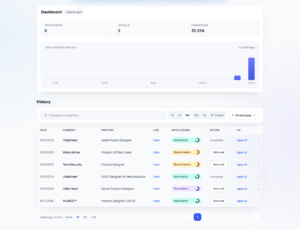
When you open the Job Tailoring area, the dashboard gives you the quickest read on search momentum. The main signals are Applications, HR Calls, and Conversion, which means you can review progress without opening every history row one by one. For most job seekers, that is the difference between feeling lost in a long list and having a simple snapshot of where the search stands right now.
The daily applications chart adds the context that memory usually hides. It shows activity for the selected history period, and hovering a bar reveals the exact date and count. That makes it easier to see whether your search was active this week, quiet last week, or uneven in a way that would not be obvious from the number of open tabs in your browser. The chart is especially useful when you want to notice pace, not just totals.
Use the dashboard as a checkpoint rather than a scorecard. If Applications are moving but HR Calls are flat, you may want to revisit which roles you are targeting or how closely they match the profile you are tailoring from. If the chart is sparse, the search itself probably needs attention before you worry about any single application. The view helps you notice momentum early, which is more useful than trying to reconstruct it later from memory.
How to find and reuse past tailoring runs
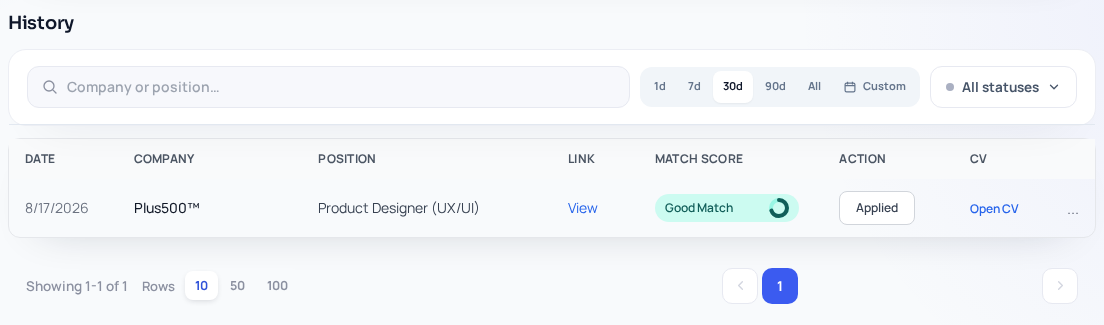
The history view is where CVZilla becomes a practical tracking tool. You can search by company or position, narrow the list with time filters from 1d, 7d, 30d, 90d, All, or a custom date range, and filter by application status: All statuses, CV Created, Applied, or Got a Call. Search and status updates apply immediately, and active filters appear as chips you can remove whenever you want to widen the view again.
Each row or card gives you the date, company, position, processing status, application status, score, and actions. That is enough context to tell whether the run is completed, still moving, or worth revisiting, without opening a spreadsheet or hunting through older downloads. It also gives you a cleaner way to keep one record per role, which matters when you are comparing similar openings that happened around the same time.
Completed rows can be opened, and the menu lets you reopen the result, reoptimize, advance or reset application status, or remove the item. In practice, that means you can keep the original record intact instead of copying the same vacancy into a new session every time you return to it. Reopening a prior run is the simplest way to preserve the trail of what you changed and when you changed it.
If you are revisiting the same opening, the Jobs page is often the easiest place to compare the original listing with the tailored version you saved. That keeps your review grounded in the source role rather than whatever you remember from last week. It is a small habit, but it helps you avoid duplicate effort and makes the history view more than just a list of old runs.
A simple weekly workflow and what CVZilla does not promise
A simple weekly rhythm is enough for most job searches. Start by checking the dashboard, then scan the last few days or the last few weeks of history for anything whose status no longer matches reality. From there, decide what should move forward, what should stay parked, and what deserves another look. The point is not to create a perfect process; it is to keep the record honest while the search is still moving.
A practical routine looks like this: review Applications and HR Calls first, filter history to a time window that matches your pace, update rows that have progressed, and reopen completed runs when you return to the same opening. That keeps your application trail easier to read and makes follow-up decisions less arbitrary. It also gives you a single place to check whether a role is still active, already applied, or ready to be revisited later.
The important part is expectation-setting. CVZilla can help you stay clearer, more consistent, and more relevant as you tailor and track your search, but it does not guarantee ATS success, recruiter attention, interviews, or job offers. It is an organization and tailoring tool, not a promise of outcomes. That is a good trade for job seekers who want less chaos and more visibility without pretending the search is under their full control.
If your job hunt is starting to sprawl, CVZilla gives you a straightforward way to keep the record together: tailor from a truthful starting point, use the dashboard to read momentum, and rely on history to see what you already did.
That combination is enough to make follow-up decisions easier and duplicate work less likely. Open Job Tailoring when you want to review your dashboard and history, then move the next role forward with less guesswork.